TheGadgetNow | Gadget And Digital Lifestyle: Tips and Tricks
Showing posts with label Tips and Tricks. Show all posts

Wednesday, 22 February 2017

HOW TO REMOVE BLACKBERRY MESSENGER ADS WITHOUT MOD

15:11 1
HOW TO REMOVE BLACKBERRY MESSENGER ADS WITHOUT MOD


BlackBerry Messenger, also known as BBM, is a internet based instant messenger and videotelephony it is developed by Blackberry Limited (formerly known as Research In Motion). As the "best" instant messenger, now Blackberry Limited was add some ads to their application. Maybe, some people assume that ads is disturb their activity. So, TheGadgetNow will give you a trick How to remove BBM ads without mod or download something .


      1. Make sure that your BBM is newest version. If not, you can upgrade first from Google                         Playstore
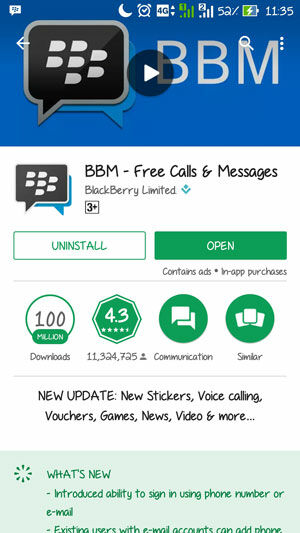
      
Picture 1.1
BBM in Google Playstore. img src: jalantikus.com


     2. To Remove ads from BBM, it is very simple. You can just change BBM feeds setting. Change it from "All" to "Contacts"
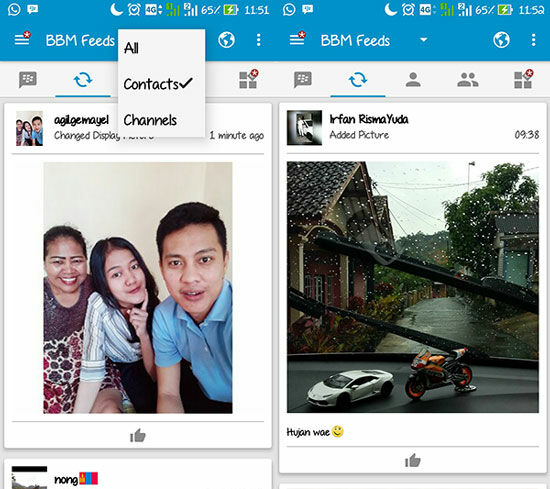

Picture 1.2
How to Remove BBM Ads. img src : jalantikus.com


3. Very easy, right? Without complicated way and risky contact with malware from the mod app, now you can remove the ads with safely. Good luck! (TheGadgetNow)

Sunday, 19 July 2015

How to distinguish the original Samsung Galaxy S6 and the Fake Galaxy S6!

01:17 0
How to distinguish the original Samsung Galaxy S6 and the Fake Galaxy S6!


Not only HTC Vendor that surprising visitors at Mobile World Congress (MWC) 2015 in Barcelona with their latest product is amazing. Largest smartphone manufacturer named HTC One M9, Samsung, too, introduced their latest smartphone the Samsung Galaxy S6 and S6 Edge. It looks like Samsung is not half-hearted in both designing their latest flagship device. The first time South Korean electronics company is applying the use of metal and glass in the unit S6 and S6 Edge. This flagship duo also brings design and similar spec therein. But to S6 Edge screen design has a curvature in the right and left sides.

Even one of the leading smartphone application performance measurement, Antutu Benchmark, enter the name of Samsung Galaxy S6 into the list of the Best 10 Smartphone Performance 2015. With high specification and included in the high-end smartphones, so don't be surprised if a lot of people interested to have this smartphone.

But It is often exploited by unscrupulous traders to sell the Fake Samsung Galaxy S6!
They sell the Samsung Galaxy S6 False for various reasons, such as to benefit a lot, although adverse buyers. 

Then how to distinguish Samsung Galaxy S6 Original and the Fake?
For those of you who are unfamiliar with the smartphone, or at least not yet know how to distinguish the samsung S6 Original and fake, you are very advised to view this video tutorial below:

youtube source : Techrax


Thursday, 16 July 2015

Tutorial How Regram photos on Instagram for Android

00:35 0
Tutorial How Regram photos on Instagram for Android
Thegadgetnow this time will share tips and trick on How to repost an Instagram Photo of your friend to your instagram account, it is very easy. But consider first the following if you do not understand. Instagram repost facility itself does not exist, therefore the required third-party applications that you can have through download from the Play Store. Here's the full tutorial


  1. Make sure you remember your username and password. It is to login to the application Repost.
  2. Open Google Play Store.
  3. Then, type in the keyword "Repost for Instagram" or something related to reposting it on Instagram.
  4. If the download process has been completed, you can open it and then do what is required by the application. In this case, you are required to Log In, using your Instagram account
  5. Once you have successfully logged in, then you will see the feed or photo updates from your friends, choose the photos as you want and then tap the photo, then tap "Repost", wait a minute, it will automatically be uploaded to repost photo application Instagram.
  6. Next you just publish it.
  7. And Done :)

Well, that way Repost Instagram photos with Easy. Hopefully helpful,, if still not clear, please leave a comments.